The short answer
| Content | Best choice | Why |
|---|---|---|
| Photograph | JPG or WebP | Smooth gradients compress well in lossy formats |
| Screenshot, interface, text | PNG or lossless WebP | Sharp edges and flat colours; lossy formats add speckles |
| Logo, icon, diagram | SVG if possible, otherwise PNG | Crisp at any size |
| Cut-out with transparency | PNG or WebP | JPG has no transparency |
| Maximum compatibility | JPG or PNG | Accepted by every app and form |
Test 1: a photograph
We encoded a 640×427 photograph of a launch pad at dusk in each format using Chrome 141.
| Format | File size |
|---|---|
| PNG (optimized, lossless) | 305 KB |
| PNG (as re-encoded by the browser) | 435 KB |
| JPG quality 90 | 50 KB |
| JPG quality 80 | 31 KB |
| WebP quality 80 | 24 KB |
For photographs, PNG is ten times larger than a decent JPG. That is the price of lossless quality, and since the human eye cannot see the difference between PNG and a good JPG at normal size, it is rarely worth it. The WebP file was about 25% smaller than the JPG at the same slider value, although the two numbers are not perfectly comparable.
Test 2: text and flat colour
Now the opposite case: a synthetic screenshot-style graphic of 900×500 pixels with text rows on a white background.
| Format | File size |
|---|---|
| PNG (optimized, lossless) | 23 KB |
| PNG (as saved by the browser) | 36 KB |
| JPG quality 80 | 43 KB |
| WebP quality 80 | 13 KB |
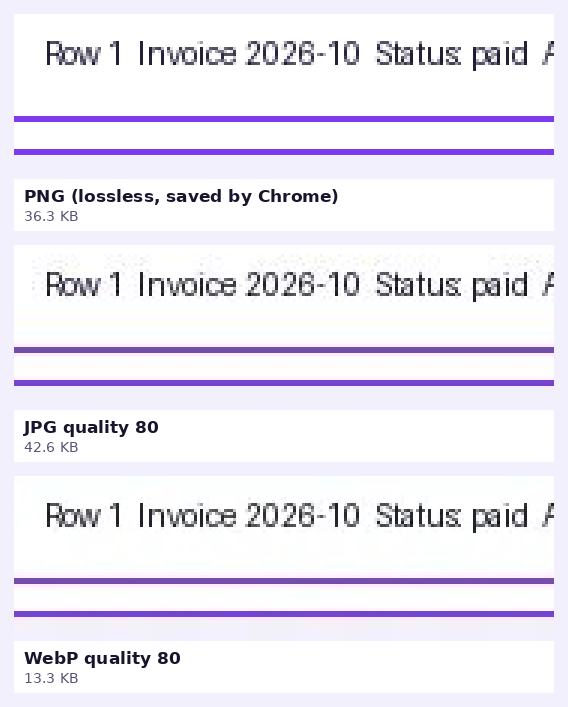
JPG lost twice: its file was larger than the PNG’s and the text looked worse. This is why JPG is the wrong format for screenshots. Lossy WebP gave the smallest file, but lossy compression of text always carries risk, so for documentation and legal screenshots we prefer lossless formats.
Transparency
PNG and WebP support transparent pixels, including soft semi-transparent edges, which matter for cut-outs made with a background remover. JPG fills transparent areas with a solid colour (usually white or black) because it has no transparency channel. If you convert a transparent PNG to JPG with the Image Converter, the transparent areas become white.
Compatibility
- JPG and PNG work everywhere and always have.
- WebP is supported by all current major browsers. Some older software, print shops and forms still refuse it. If that happens, see how to convert WebP to PNG.
Which should you choose?
- Is it a photograph? Use JPG for compatibility or WebP for smaller files.
- Does it contain text, lines or flat colours? Use PNG (or lossless WebP).
- Does it need transparency? Use PNG or WebP.
- Is it a logo or icon? Prefer SVG on websites, PNG for everything else.
- Is the file for upload to a service with rules? Follow their rules.
A note on “saving as” again and again
Converting from a lossy format to a lossless one does not restore lost detail. A JPG saved as PNG is still a JPG in quality, only larger. Keep the original and convert from it.
Try it: Image Converter
Convert between PNG, JPG and WebP in one click. Free, private, and it runs in your browser.
Open Image ConverterFrequently asked questions
Is PNG better quality than JPG?
PNG is lossless, so it never loses detail when saved, but a photo saved as JPG at high quality looks the same to most people and is much smaller.
Is WebP better than PNG?
WebP can be much smaller and supports transparency. PNG is more universally accepted by apps and forms.
Which format is best for websites?
WebP for most images, SVG for logos and icons, and a JPG or PNG fallback only where needed.
Can I convert PNG to JPG without losing quality?
No, JPG is lossy, but at 85–92 quality the loss is usually not visible for photographs.
Why does my screenshot look worse as JPG?
JPG is designed for photographs and adds artifacts around sharp edges such as text.